
An AI medical receptionist helps with patient access: answering calls, arranging eligible appointments, capturing requests and handing work to staff. An AI medical scribe helps with clinical documentation: turning an encounter into a draft note for the clinician to review. Both can use voice, but they start with different conversations and produce different results.
Choose reception support when the bottleneck is reaching the clinic and completing administrative requests. Choose documentation support when the bottleneck is preparing and finishing clinical notes. A clinic can need both; the buying decision becomes clearer when each tool has its own job and measure of success.
TalkToMedi publishes this guide as a provider of an AI front desk. We compare the work reception and documentation tools produce and how each supports the clinic team.
Start with the point where work gets stuck
Imagine a clinic with two queues. Patients leave messages because reception is busy with arrivals. Meanwhile, physicians have unfinished encounter notes at the end of the day. A better documentation tool may help the second queue while the phones continue ringing. Better call coverage may help the first while notes remain unfinished.
Spend a week observing those queues before buying anything. Record common call reasons, staff follow-up time and the work involved in scheduling exceptions. Ask clinicians to distinguish drafting time, correction time and the time needed to put the approved note into the record. Aggregate measures are enough for this first comparison.
The aim is to name a job precisely: “Reduce callbacks for routine appointment changes,” or “Reduce time spent preparing and finalizing follow-up notes.” That description is far more useful than “We need AI.”
Five categories that are easy to confuse
An AI medical receptionist interacts with patients about approved administrative work. Its useful output might be a correct appointment, a structured staff request or a handoff with context. Every proposed action needs a defined scope and a verified connection to the relevant clinic system.
An AI medical scribe, often called an ambient scribe, captures an encounter and prepares clinical documentation. The College of Physicians and Surgeons of Ontario distinguishes it from dictation software: the scribe summarizes the encounter for physician review, while dictation converts speech into text.
A human medical scribe is a documentation assistant working under the clinician's supervision. The American Medical Association describes this role as entering information during clinical visits. The actual service can differ by staffing arrangement, training and agreed tasks; clarify those details rather than assuming that “scribe” includes every administrative duty.
Medical dictation software starts with a clinician intentionally speaking the content they want documented. It can be useful when the clinician wants to control the wording or add information after a visit. Formatting and additional features vary by product.
Medical transcription services convert recorded medical speech into written reports and may review or edit speech-recognition drafts. The U.S. Bureau of Labor Statistics describes those activities. This explains the category; it does not establish any particular service's availability or rules for a Canadian clinic.
| Category | Typical input | Main output | What to verify |
|---|---|---|---|
| AI medical receptionist | Patient's call or message | Approved administrative action or staff handoff | Correct end state, workflow scope and escalation |
| AI medical scribe | Clinical encounter | Draft clinical note | Accuracy, consent, clinician review and record workflow |
| Human medical scribe | Encounter observed or accessed under the agreed service | Documentation prepared under supervision | Training, scope, availability and clinician review |
| Medical dictation | Clinician's intentional speech | Editable text | Recognition accuracy and correction workflow |
| Medical transcription | Recorded dictation or speech-recognition draft | Transcribed or edited report | Turnaround, quality, secure handling and review |
Follow one patient through the clinic
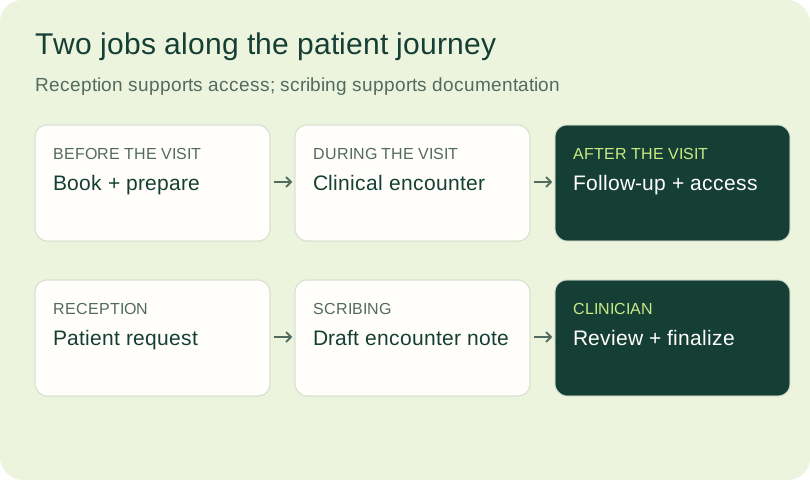
Before a visit, the patient may need to book the correct appointment type, identify the location or change an existing booking. Reception support operates here. The system needs the clinic's administrative rules, the available scheduling information and a clear response when the requested action cannot be completed.
During the encounter, documentation support operates around the clinician-patient conversation. A draft must reflect what actually occurred. It may need the clinic's preferred note structure, specialty terminology and a practical process for correcting omissions or errors.
After the encounter, both types of work can appear. The clinician reviews and finalizes the note. The clinic may arrange an approved follow-up, contact the patient from an assigned task or send the care team's prepared instructions. Do not assume that generating text also books the follow-up, or that booking the follow-up creates a reviewed clinical record.
A provider offering multiple capabilities should demonstrate each one separately. Ask where information is stored, which system remains authoritative and who owns the next step when a task crosses from documentation into patient communication.
How MEDI turns an assigned EMR task into follow-through
MEDI can work from staff-assigned EMR tasks through supported, configured integrations. Your clinic defines the outreach requests and actions it authorizes. A task asking the clinic to arrange a follow-up starts from a decision made by the clinical team.
MEDI contacts patients about clinic-approved requests and makes outreach outcomes available for staff review. Your team can see booked visits, patient responses and requests that need further attention. During your demonstration, review patient verification with the clinic team using fictional test patients.
For a hypothetical example, a clinician decides that a patient needs a routine follow-up. Staff review the request and authorize outreach. MEDI contacts the patient and, where the connected system supports it, helps arrange an appointment using the clinic's visit and provider rules. Staff can review the outcome and next step. This example contains no real patient details.
Review outreach outcomes so staff can identify any remaining follow-up. Measure completed requests separately from attempted contact. The value of the workflow is that MEDI helps carry a clinic-approved request through patient contact and a clear next step.
Outreach outcomes describe administrative follow-through. Encounter documentation records the clinical visit and requires clinician review. The clinician retains ownership of the clinical decision, while staff review patient communication and scheduling outcomes. This gives documentation and outreach separate responsibilities even when they sit around the same visit.
Assess reception and documentation separately
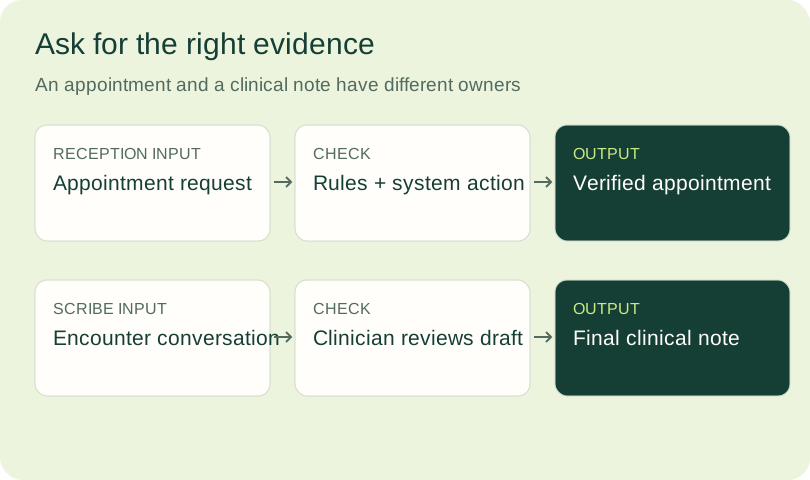
An organization can offer both patient-access and documentation tools. Evaluate each function by the work it produces: encounter documentation prepares material for clinician review; receptionist and outreach workflows act on permitted patient-access requests. Recording a phone call, summarizing an intake or adding an outreach outcome to a task does not establish ambient encounter-documentation capability.
When evaluating reception and documentation together, confirm the workflows and features included in your proposed plan. Review encounter capture or dictation, note approval and the destination for the finalized record, alongside the patient-access workflow. Assess each function using its own output: a reviewed clinical note or a completed administrative request.
Evaluate reception with a completed request
A reception demo should show more than a natural voice. Give it a routine booking change, a request outside the rules and a patient who asks for staff. Inspect the resulting appointment or task and the information available to the person receiving the handoff.
For example, changing a follow-up requires more than locating an open slot. It may require the usual provider, a specific visit length and a particular location. If any of those conditions cannot be verified, the appropriate result may be a staff task rather than a booking.
MEDI uses the clinic's appointment types, visit lengths, provider and location rules. Confirm the scheduling changes supported by your system and configuration during the demonstration.
Evaluate correct completions, repeat calls, transfer quality and staff rework. Count captured requests separately from completed actions. If you are also considering a live service, our AI receptionist versus medical answering service guide applies the same tests to live, AI and hybrid coverage.
Evaluate scribing with a reviewed note
For documentation support, start with representative encounters and a clinician-approved evaluation process. Assess whether the draft captures the relevant facts, preserves the intended meaning and avoids adding unsupported information. Then time the full path through correction and finalization. A quickly generated draft that takes longer to repair does not solve the intended problem.
Ontario physicians should consult CPSO's current AI guidance. It states that physicians remain accountable, should review AI-generated information for accuracy and completeness, and must obtain consent before recording conversations using AI. Make the patient explanation and alternative workflow part of implementation.
The Information and Privacy Commissioner of Ontario's AI scribe checklist is a further resource for health information custodians considering these tools. Requirements and professional guidance depend on the clinic's jurisdiction and deployment. Review the actual data flow and service terms with the appropriate clinic lead.

Build two budgets when the clinic needs both
Reception and documentation can both create value, but adding their advertised time savings together can exaggerate the result. Use a separate baseline, cost and outcome for each workflow.
For reception, include setup, service charges, telephony, integration support, monitoring and the staff time left after the call. For scribing, include the proposed subscription or staffing cost, training, equipment where required and clinician review. Check the full workflow rather than the time spent in the tool's interface.
Recovered time creates capacity. Cash savings require a real reduction in expense, and additional revenue requires genuinely incremental completed visits. Avoid counting the same appointment twice as both a reception benefit and a documentation benefit. The medical call automation ROI calculator makes the reception assumptions explicit; apply the same discipline to a separate documentation business case.
A short decision checklist
- Where is the main backlog: patient requests, documentation, or both?
- What output must the proposed tool produce, and who approves it?
- Can the vendor demonstrate that output in the proposed clinic workflow?
- What review, correction or callback work remains for staff and clinicians?
- What information is captured, where does it travel, and how long is it retained?
- What happens if a patient declines, requests a person or the connection fails?
If the clinic needs both capabilities, choose a bounded first workflow with an accountable owner. Review the experience before adding the next. Use our Canadian clinic AI receptionist procurement checklist for the patient-access review, alongside the relevant documentation guidance for scribing.
Map the patient-access work with TalkToMedi
TalkToMedi's medical AI receptionist supports patient calls, appointment changes, intake capture and clinic-defined handoffs. Patient outreach covers approved referral, recall and reminder workflows. Confirm the available actions for your system and configuration.
Book a workflow demo with the call or message that creates the most repeat work for your team. Bring the rule that makes it difficult. That gives you a concrete way to assess whether the proposed reception workflow addresses the bottleneck you actually have.
Sources and further reading
Product information reviewed October 4, 2026. Confirm the workflows and features included in your proposed plan and clinic configuration.