
To calculate medical call automation ROI, compare the work your staff does today with the work that remains after automation, then account for the full project cost. Report staff hours returned separately from actual cash savings. An appointment booking also needs its own evidence before you assign it financial value.
A calculator is useful when every assumption can be explained. This guide provides a method you can reuse for an AI receptionist, a medical answering service or a combination of both, with a synthetic example and an editable worksheet.
Calculate your clinic’s scenario
Use this hypothetical scenario to explore the value of completed clinic work. All example volumes, costs and outcomes are illustrative; they are not TalkToMedi pricing or customer results. Replace the inputs with your clinic’s measured values. Amounts are CAD. This calculator runs in your browser and does not upload your values.
The capacity-inclusive view values all returned hours and counts verified payroll savings within that same value. It does not add the two together. Optional appointment contribution starts at zero.
1. Start with one workflow and one baseline period
Choose a representative month and a defined administrative workflow, such as eligible appointment requests or routine clinic-information calls. Gather phone-system reports, a call-reason sample, staff handling times and current invoices.
Use currently staff-handled calls for the workload calculation. After-hours calls your team never handled cannot automatically become “staff time saved.” Keep missed-call recovery as a separate patient-access outcome until you can measure what happens to those requests.
Record repeated contacts for the same need where feasible. Three retries to book one appointment are three phone events and one patient need. Counting every retry as an additional appointment opportunity inflates the model.
If you are still choosing a coverage model, read AI receptionist versus medical answering service. If the burden is charting after visits, the relevant decision may be AI medical receptionist versus AI medical scribe. Keep each business case tied to the work it changes.

2. Define eligibility and completion before estimating savings
Eligibility is the share of baseline calls the proposed workflow is allowed to handle. Completion is the share of those eligible calls that reaches the agreed end state.
For booking, completion might require the correct provider, visit type, time and confirmed appointment in the clinic system. For an information request, it might require the correct approved answer. A captured message or a transfer belongs in its own outcome category if staff still need to complete the original task.
Use the same definitions when comparing vendors. “Calls answered” is useful for access, but it does not tell you how much administrative work disappeared. For privacy, integration, escalation and test requirements, use the Canadian clinic procurement checklist.
Measure the work MEDI completes for your team
MEDI supports patient calls, appointment requests and clinic-approved outreach. To evaluate the impact, choose the outcomes your team needs: a correctly booked visit, an approved answer, a useful staff request or a completed follow-up. Record those outcomes separately so each measure has a clear operational meaning.
For appointment workflows, check the patient, provider, appointment category, duration, location and time in the clinic system. For staff-authorized outreach, follow the approved request through contact and a recorded outcome. Distinguish booked visits, patient responses and requests that still need your team. These records show which work has been completed and which work reception or the care team will continue.
The staff-effort measure should use your clinic's baseline. Sample routine calls before the pilot and record the minutes staff spend handling them. During the pilot, time additional review, corrections and follow-up using the same scope. This provides measured inputs for the calculator below and helps identify where a workflow can be improved.
Keep estimated values and observed results clearly labeled. A planning estimate is useful for comparing scenarios; a measured result comes from the clinic's own workflow records and staff-time sample. Actual cash impact also depends on a change in paid expenses, such as overtime, temporary coverage or an outsourced service.
Use a consistent period and count each measure explicitly: total call events, eligible requests, completed workflows and staff follow-ups. Track repeat calls for the same need so they do not become separate appointment opportunities. Measure after-hours access separately, including requests your team previously never handled.
Together, these measures show how MEDI supports patient access and returns administrative capacity. They give clinic leaders a practical basis for comparing outcomes, remaining staff work and project spending.
Read a clinic story with its outcome definition
TalkToMedi's published Markham clinic story describes how MEDI supported overflow and after-hours demand, booking requests, clinic questions and structured callbacks. It reports a 93% successful handling rate, defined there as calls resolved directly or routed appropriately. The story illustrates patient-access support through both direct answers and useful staff handoffs.
Use those workflows to plan your clinic's pilot. For your own calculator scenario, measure completed workflows, staff time and costs using your clinic's baseline and outcome review.
3. Estimate returned hours after residual work
The first calculation estimates how much existing call workload could be completed by the proposed service:
eligible calls = baseline staff-handled calls × eligible share
completed workflows = eligible calls × verified completion rate
gross hours avoided = completed workflows × baseline minutes per call ÷ 60
Subtract additional clinic staff review and rework introduced by the workflow, including corrections and audit sampling. Existing handling of requests that automation does not complete remains in the baseline; do not subtract it again. Define the exception share as the percentage of eligible attempts that introduce additional staff effort, and exception minutes as that incremental effort beyond existing handling.
exception hours = eligible calls × exception share × minutes per exception ÷ 60
net hours returned = max(0, gross hours avoided − exception hours − review hours)
capacity value = net hours returned × loaded staff cost per hour
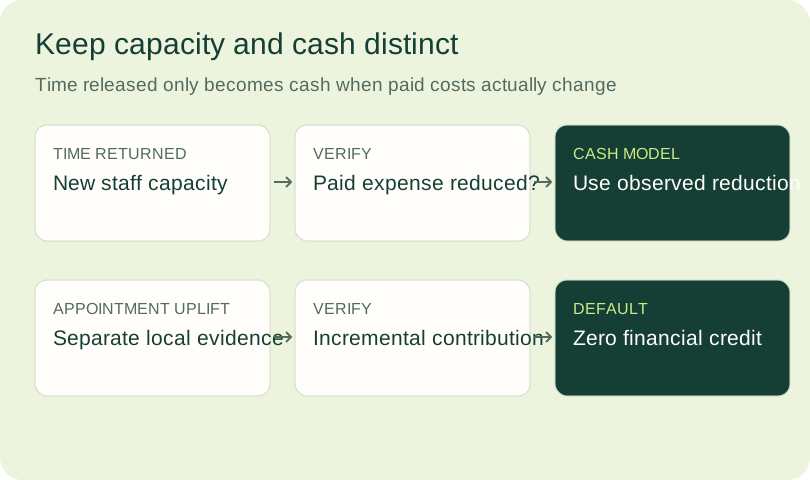
Use a loaded hourly cost supplied by the clinic, including relevant employer costs. Returned time may let staff serve patients in person, clear a queue or finish work within scheduled hours. Payroll only falls if the clinic actually changes a cost, such as overtime, paid temporary coverage or outsourced work.
If residual effort exceeds avoided hours, record the increase in workload as well as showing zero returned hours. That result may mean the workflow needs redesign before expansion.
4. Count project spending and avoid double counting
Collect current written quotes and the actual billing units. Include base platform fees, usage, telecom or messaging, premium coverage, integration and any additional billed monitoring or support. Include one-time configuration, training and internal implementation costs where material.
For a capacity comparison, staff exception and review time has already been subtracted from returned hours. Do not charge the same retained labour a second time as a new expense. Additional overtime, contractors or externally billed review are cash costs and belong in the project spending line.
Current service costs are only a benefit if they will actually end or decrease. Keeping an answering service as fallback may be sensible, but its retained cost is not an avoided expense.
monthly project cash cost = platform + usage + integration + coverage
                           + additional billed support or staffing
first-year project cost = 12 × monthly project cash cost + one-time setup
For an apples-to-apples comparison, use the same period and scope for live, AI and hybrid coverage. Include residual clinic work in each model.
5. Read a synthetic example
The values below are invented planning assumptions in Canadian dollars. They are not a TalkToMedi quote, market benchmark or customer result.
| Input | Synthetic assumption |
|---|---|
| Currently staff-handled relevant calls each month | 2,400 |
| Eligible share | 55% |
| Completion among eligible attempts | 70% |
| Baseline handling time | 4 minutes |
| Eligible attempts introducing extra staff effort | 20% |
| Additional staff minutes per exception | 3 minutes |
| Monthly review time | 8 hours |
| Loaded staff hourly cost | C$32 |
| Monthly project cash cost | C$1,000 |
| One-time setup | C$1,800 |
| Verified avoided current service cost | C$0 |
| Share of capacity converted to payroll savings | 0% |
| Incremental appointment contribution | C$0 |
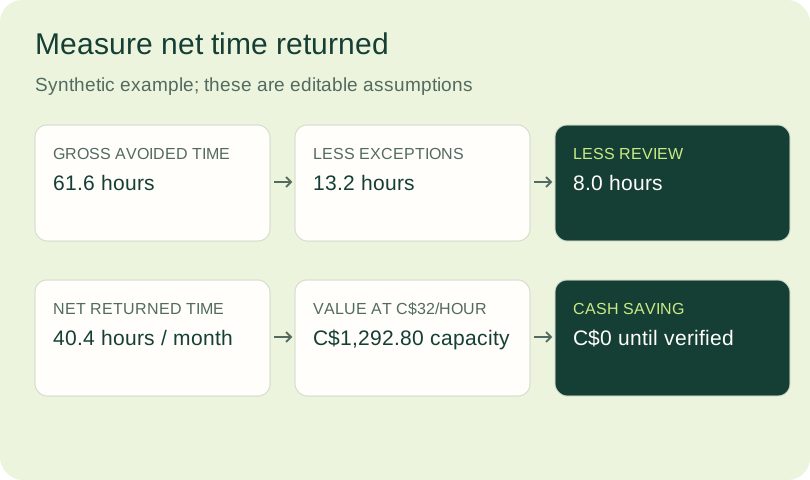
The model produces 1,320 eligible calls and 924 completed workflows. It estimates 61.6 gross hours avoided, less 13.2 exception hours and 8 review hours, returning 40.4 staff hours per month. At C$32 an hour, that is C$1,292.80 of capacity value.
The first-year project cost is C$13,800. Capacity value across twelve identical months is C$15,513.60, producing a capacity-inclusive planning return of 12.4%. This calculation assigns a value to time that the clinic can redirect.
With payroll realization, avoided service cost and appointment contribution all at zero, the example shows no verified cash benefit. First-year cash ROI is −100%, and there is no cash payback period. The clinic could still decide that better access and 40.4 hours of staff capacity are worth the expense; that decision should be stated in those terms.
6. Keep cash ROI and payback on their own lines
Enter the share of returned capacity that demonstrably changes payroll or another paid labour expense. Use zero until the clinic can defend a different number.
monthly cash labour saving = capacity value × verified cash-realization share
monthly cash benefit = cash labour saving + avoided service cost
                       + approved incremental appointment contribution
first-year cash ROI = (12 × monthly cash benefit − first-year project cost)
                      ÷ first-year project cost × 100
monthly net cash benefit = monthly cash benefit − monthly project cash cost
cash payback months = setup cost ÷ monthly net cash benefit
Only calculate payback when monthly net cash benefit is positive. Show “No cash payback” otherwise. If project cost is zero, ROI has no meaningful denominator; show it as unavailable.
Avoid adding “hours saved” and payroll savings together. Payroll savings are the realized portion of the same time benefit.
7. Treat appointment opportunity as a separate estimate
More answered calls can improve access, but bookings are not automatically kept visits or incremental financial contribution. Check appointment capacity, repeat requests, cancellations, patient eligibility and what would have been recovered through the existing process.
incremental kept visits = additional eligible bookings × kept-visit rate
                          × genuinely incremental share
appointment contribution = incremental kept visits × approved contribution per visit
Use contribution after relevant costs, rather than gross billing. For publicly funded visits, funding, payment rules and provider capacity can change the economics. Keep the calculator's appointment contribution at zero unless the clinic has an approved, applicable method. Track completed access and patient experience even when they have no dollar value in the model.
8. Use a pilot to replace assumptions with measurements
Run conservative, base and stronger-performance scenarios. Change eligibility, completion and residual workload using observed ranges. Keep recurring costs and setup visible in every scenario.
During the pilot, sample completed requests, check system records and time staff follow-up. Record safety incidents, complaints, failed handoffs and outages alongside the financial model. Expand only after the clinic reviews both the operating results and unresolved risks.
TalkToMedi's clinic playbooks describe starting with defined instructions and reviewing the first workflow before expanding. Its integration information also makes clear that available actions depend on the clinic's system and configuration.
Use your scenario in a workflow review
Use the calculator on this page with aggregate counts, times and costs. Download the ROI assumptions worksheet to record the source, owner and confidence for each input. Patient names, recordings and health information are unnecessary for this planning exercise.
Bring your call-volume report, workflow scope and current quote to a TalkToMedi workflow discussion. The useful next step is to test which requests can be completed and how much staff work remains.
Sources and method
- The formulas and synthetic example above are an original planning model. They do not forecast a particular clinic's financial outcome.
- TalkToMedi clinic playbooks and integration information, reviewed October 4, 2026.
- For procurement and privacy review, see the linked Canadian clinic checklist and its primary regulator references.
- TalkToMedi: How a Markham clinic recovered missed calls, published December 1, 2025; reviewed October 4, 2026. The reported handling outcome includes direct resolution and appropriate routing.