
Before buying a medical AI receptionist, define the calls it may handle, the actions it may take, the information it will process and the situations that need your staff. Then require evidence: a documented data flow, a demonstration using your booking rules, tested human handoffs and a pilot scorecard with clear outcome definitions.
A useful procurement process ends with a decision your clinic can explain. This checklist gives your operations, privacy, IT and clinical leads a shared set of questions to work through before approving a pilot or contract.
1. Identify the problem you are buying a solution for
Start with a representative two to four weeks of phone-system reports and a sample of call reasons. Include busy mornings, lunch coverage and after-hours demand. Record offered calls, answered calls, repeat attempts and the staff work that follows.
Describe the problem in operational terms: “Our team spends two hours each day returning appointment voicemails” is actionable. “We need AI” does not identify a workflow or a measure of success.
Different tools help with different work. An answering service may capture messages and provide human coverage; an AI receptionist may complete approved administrative requests; a scribe supports documentation around the clinical encounter. Use our comparisons of AI receptionists and medical answering services and AI medical receptionists and AI medical scribes to match the tool to the burden.
Choose one or two starting workflows. A smaller scope gives your team a clearer test and makes exceptions easier to investigate.
2. Create an allowed-action register
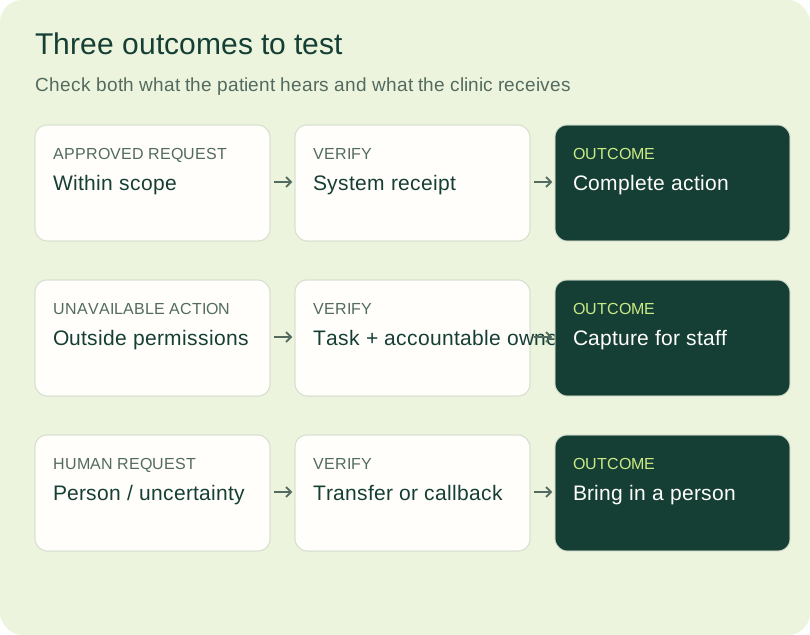
For each call reason, record what the service can do and where the work ends. Answering a question, capturing a message, transferring a caller and confirming a booking are different outcomes.
| Call reason | Allowed action | Evidence of completion | Staff destination |
|---|---|---|---|
| Clinic hours and location | Answer from approved information | Correct answer given | Reception if uncertain |
| Eligible follow-up booking | Book within approved rules | Confirmed appointment in the system | Booking queue on failure |
| Prescription refill request | Capture the required request | Task delivered to the designated queue | Clinical team |
| Preparation or medication concern | Route using clinic instructions | Handoff reaches the designated team | Appropriate clinical staff |
These are sample fields, not instructions for a particular clinic. Your team should approve each row, including information the service must never provide or collect. For booking, specify provider, visit type, duration, location, patient eligibility and appointment restrictions.
Ask the vendor to use the same register in its proposal and reporting. A correct transfer can be a successful safety outcome while still leaving work for staff.
3. Review privacy through a complete data flow
List the clinic's province, organization type and applicable privacy framework. Have your privacy lead assess the exact workflow and contract. This guide is a procurement aid; the clinic still needs a review suited to its jurisdiction and circumstances.
For Ontario organizations, the IPC's Digital Health under PHIPA overview is an official starting point for electronic health records and related responsibilities. Its AI scribe guidance also addresses vendor assessment, contractual safeguards, governance and ongoing monitoring. Those procurement questions are useful for reception tools; a receptionist still needs its own workflow assessment.
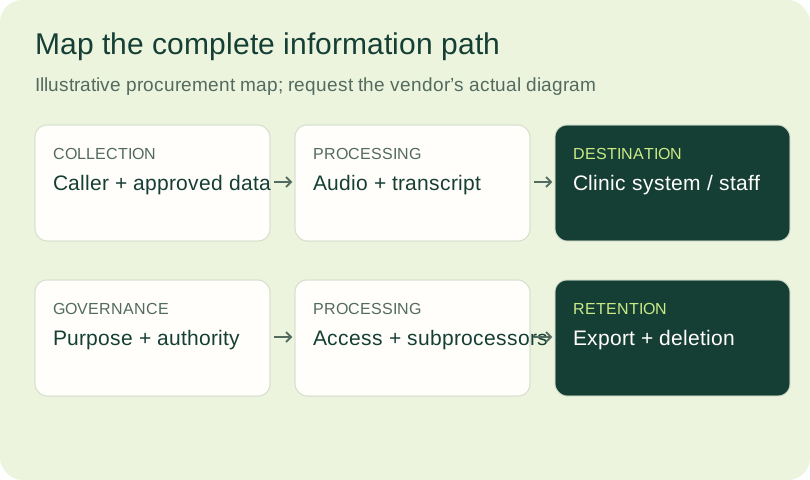
Request a field-level diagram covering collection, processing, storage, backups, staff access and deletion. Include recordings, transcripts, identifiers, appointment data, logs and analytics. Ask which third parties handle each category and whether information is used for model training or another secondary purpose.
Where PIPEDA applies, the OPC's cross-border processing guidance emphasizes accountability, protection and transparency. It does not prohibit transfers for processing outside Canada. A Canadian hosting statement is one input to your review; verify the full flow, applicable provincial rules, contracts and access arrangements.
4. Ask for documents that resolve specific questions
Build an evidence folder your reviewers can revisit. Request:
- A dated system and subprocessor inventory, with purposes and processing regions.
- Contract terms covering permitted use, confidentiality, safeguards, incidents, changes and exit.
- A retention schedule for audio, transcripts, logs, system records and backups.
- Role-based access and audit-log descriptions, including vendor support access.
- A patient transparency and consent approach reviewed for your workflow.
- An incident process with named contacts, investigation support and notification responsibilities.
- Export and deletion procedures for the end of the contract.
Track whether a document was requested, received, reviewed and accepted. A document's title does not establish that it applies to your configuration. Record the version, unanswered questions and the person accountable for closing them.
For TalkToMedi, trust and safety documentation can support this conversation. Ask which documents cover your province, product configuration and integration.
5. Make the EMR demonstration use your rules
Give the vendor synthetic cases that resemble your appointment pathways. Test a routine booking, a correction, a cancellation, a full schedule, an unsupported visit and a failure after a patient says yes.
Watch the destination system, as well as the conversation. Confirm what was read, what was written, which permissions were needed and how staff can trace the action. Check what happens when a system times out: the patient should not receive an unverified booking confirmation, and retries should not create duplicate appointments.
Record each claimed integration capability separately. Reading availability, creating appointments, updating patient details and delivering staff tasks require different evidence. Ask about your platform, edition, access method and configuration.
TalkToMedi's integration page explains that available actions depend on the platform, permissions and clinic configuration. Use that same level of specificity when comparing any proposal.
Applying the checklist to a MEDI workflow
MEDI supports routine patient calls, appointment requests and staff-authorized outreach using your clinic's instructions. A useful review follows the patient's request through to the appointment or recorded follow-up outcome, then checks what your team needs to do next.
Bring the rules that make scheduling specific to your clinic: patient eligibility, appointment category, provider, visit length and location. Include the requests reception can complete and those that need a staff decision. Ask to see a routine eligible booking, a request for an unsupported visit and a request with no suitable appointment. Confirm the available actions for your EMR and proposed configuration, and record the patient-facing next step in each scenario.
During your demonstration, review patient verification with the clinic team using fictional test patients. Confirm your clinic's requirements and the route to staff when assistance is needed. Your acceptance review should inspect the resulting appointment for the correct patient, provider, visit type, duration, location and time. Test booking changes and an unavailable connection as part of the same review.
For patient outreach, start with work your team has authorized, such as contacting patients about a reviewed referral, recall or reminder. Specify the purpose, approved instructions, contact window and next step. Follow an example from the staff request through contact and a recorded outcome. Ask how your team can distinguish a booked visit, a patient response and a request that still needs follow-up. This helps staff keep ownership of the work while MEDI carries out the agreed communication.
Request privacy and security documentation for this proposed workflow. Review the information collected, processing and storage arrangements, service providers, access, retention and deletion with your clinic's privacy lead. Record the applicable documents and agreed responsibilities alongside the workflow tests.
Bring this evidence together before the pilot: supported appointment actions, patient verification, staff handoff destinations, outreach instructions and the outcome record your team will review. The result is a clear specification for the clinic and a practical basis for evaluating the service.

6. Test the handoff and the patient's experience
Include direct requests for a person, repeated misunderstandings, distressed callers, family members, language barriers and unsupported appointment types. Have clinical staff approve the response to urgent language and medication or symptom questions.
Score the entire handoff: did the caller reach the right destination, did the team receive usable context and did the workflow preserve a clear next step? A transfer button in a demo does not show what happens when the destination is closed or the connection fails.
Check whether patients can interrupt, correct information and choose a human route. Listen for clear dates and locations, an accessible pace and an appropriate explanation of the service. Provide an alternative when a voice interaction does not meet a patient's needs.
7. Assign owners before opening the pilot
Name the people responsible for clinic information, appointment rules, privacy review, exception queues, quality sampling and incident response. Decide who approves changes and who can pause a workflow.
Write a downtime plan: the fallback phone route, the patient message, the staff response and how unresolved tasks are reconciled. Test the fallback with synthetic calls.
TalkToMedi's clinic playbooks provide a starting point for organizing approved instructions. Your team should keep a dated copy of its own workflow, test cases and decisions as the service changes.
8. Set a pilot decision rule and count the full cost
Define acceptance criteria before live volume starts. Your clinic should set thresholds suited to the workflow rather than adopting a vendor's headline completion rate.
| Pilot measure | What to record | Decision owner |
|---|---|---|
| Workflow completion | Verified completions / eligible attempts | Operations |
| Booking accuracy | Correct provider, visit, time and system record | Booking lead |
| Residual work | Review, callbacks, corrections and exception minutes | Reception lead |
| Handoff quality | Correct destination, context and next step | Clinical / operations |
| Patient experience | Complaints, human requests and sampled feedback | Clinic leadership |
| Privacy and reliability | Incidents, outages and unresolved risks | Privacy / IT |
Include implementation, usage, integration, monitoring, training and retained staff work in the cost comparison. Our medical call automation ROI guide shows how to keep staff capacity and cash savings distinct.
Agree when to pause, fix, continue or expand. A workflow should expand after the clinic has reviewed its performance, exceptions and unresolved risks.
Download the checklist and prepare your review
Use the editable procurement worksheet to record:
Requirement | Current baseline | Vendor answer | Evidence link | Test case | Owner | Status | Open issue | Decision | Review date
Bring the completed worksheet, your appointment rules and synthetic test cases to the next vendor conversation. For a TalkToMedi review, book a workflow discussion. Start with the calls your team wants help completing and ask to see the evidence for that scope.
Sources and further reading
- Ontario IPC: Digital Health under PHIPA.
- Ontario IPC: AI Scribes — Key Considerations for the Health Sector, January 28, 2026.
- OPC: Guidelines for Processing Personal Data Across Borders.
- TalkToMedi trust, integrations and clinic playbooks, reviewed October 4, 2026.