

AI RECEPTIONIST FOR TELUS HEALTH CHR
Your CHR clinic.
Patient access with continuity.
Patient calls that fit the way your CHR team works. MEDI helps organize appointment requests and follow-up around your providers, visit types and staff-approved next steps.
 MEDI + TELUS Health CHR
PATIENT CALLING
“Could I arrange another visit with my usual provider?”
YOUR CLINIC’S BOOKING RULES
Visit type · Practitioner · Location · Booking window
THE APPROVED NEXT STEP
A supported action, or a clear handoff to your team.
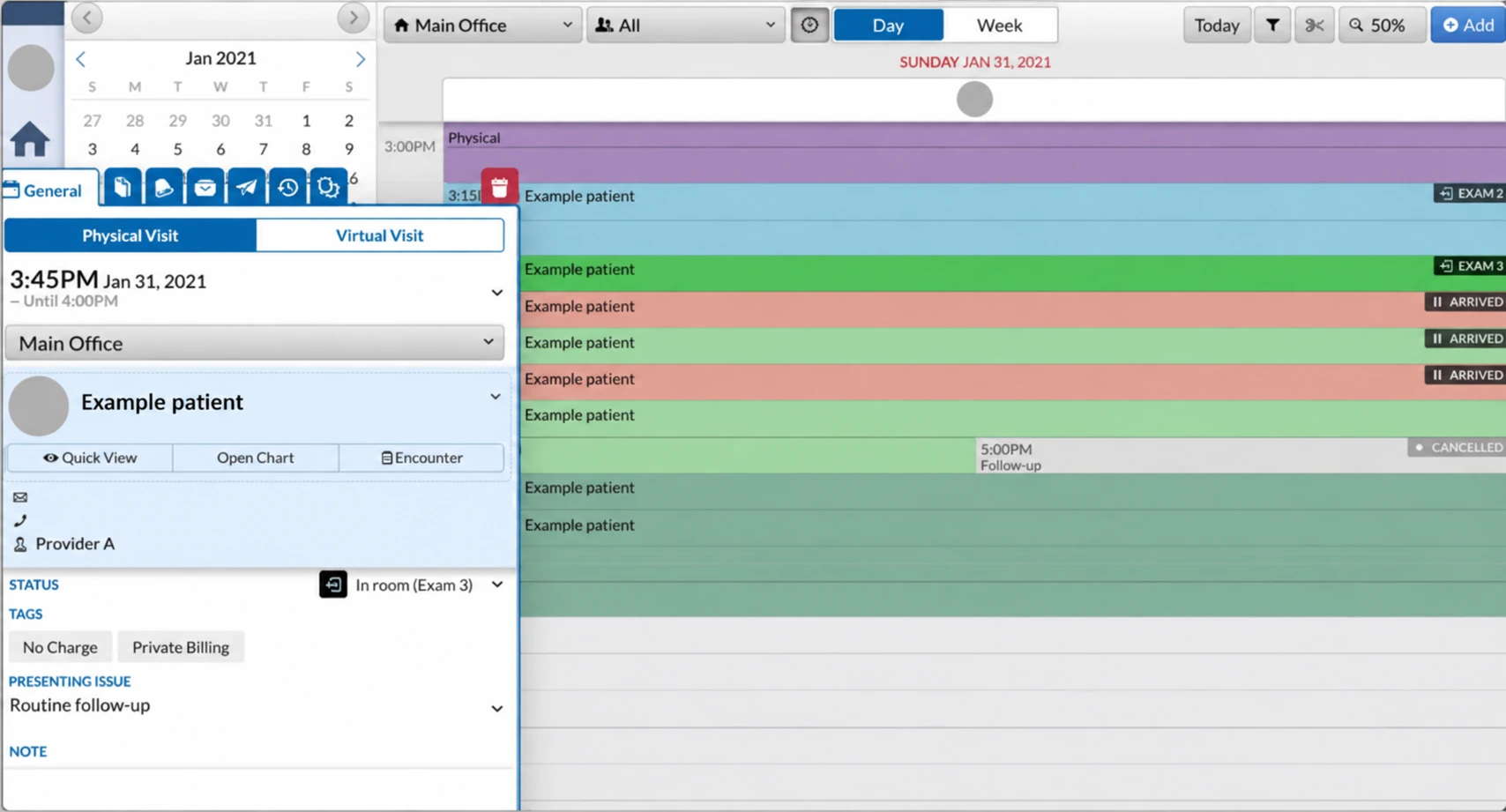 MEDIBOOKED
Appointment placed.
Directly in your CHR schedule.
- Visit
- Routine follow-up
- Time
- 3:45 PM · 15 min
- Patient
- Example patient
INCOMING CALLS & APPOINTMENTS
A patient request.
The right CHR appointment pathway.
Your CHR appointment types can carry different durations, booking windows and provider options. MEDI follows the agreed rules, including when a request needs review before it is booked.
- Identify the visit type and the patient’s preferred practitioner.
- Check the clinic-approved location, duration and booking window.
- Keep a requested appointment distinct from a confirmed booking.
Help patients navigate the next step with the context your collaborative care team needs.
Explore incoming callsPATIENT OUTREACH
Keep the next conversation
connected to the care team.
Call or text patients from approved lists about follow-ups, reviewed referrals and upcoming visits. The purpose, contact rules and available actions are agreed with your clinic.
- Family-medicine follow-up
- Specialist referral reviewed
- Virtual visit reminder
Reduce routine callback work while clinical review and scheduling exceptions stay with staff.
Explore patient outreachPatient outreachVoicemail → SMSNEW VOICEMAIL
“Has the clinic confirmed my appointment request?”
READY FOR THE NEXT STEP
The right context for your front desk.
SMART VOICEMAIL & PATIENT SMS
A missed call.
A useful next conversation.
Clarify a missed-call request by SMS and share approved appointment information. Where a request needs review, MEDI can explain the next step without presenting it as a confirmed visit.
- Capture the request and the details your team needs.
- Use clinic-approved answers and administrative instructions.
- Keep clinical questions and exceptions with the right staff.
Keep patients informed and give your reception team clearer next steps.
Explore voicemail & SMSCONFIGURED AROUND YOUR PRACTICE
The details matter.
Make them part of the workflow.
Your TELUS Health CHR setup is specific to your clinic. We review the connection, booking policies and handoff instructions together, then test the supported actions with your team.
The rules your team uses
Start with real appointment types, provider preferences and administrative instructions.
The actions your setup supports
Confirm availability, permitted changes and how the result reaches your staff.
A clear place for exceptions
Define when a request needs staff review and what context should go with it.
Appointment types
Map duration, patient eligibility instructions and the provider options your clinic allows.
Schedule rules
Review locations, provider hours and the booking windows used by the agreed workflow.
Review & handoffs
Confirm the Agent connector, request statuses and staff escalation. Supported task pilots are scoped separately.
START WITH YOUR PRIORITY
One useful workflow.
Room to grow.
- 01
Bring a familiar scenario
A routine booking, a follow-up request or a missed call your team handles often.
- 02
Review your TELUS Health CHR setup
Confirm access, available actions, booking policies and staff handoffs.
- 03
Test the whole next step
Check the patient conversation, the supported action and the information your team receives.
MEDI + TELUS HEALTH CHR
Your questions,
answered.
Can MEDI follow our CHR appointment-type rules?
We configure the conversation around your approved visit types, provider preferences and booking windows. Available scheduling actions and any staff-review step depend on your CHR setup and connector permissions.
How do we configure MEDI for our TELUS Health CHR booking rules?
We map your appointment types, providers, durations, locations and staff instructions, then review access and supported actions for your connection. Test a routine request, a change and an exception with your team before launch.
Can we begin with one workflow?
Yes. Start with overflow calls, missed-call follow-up or one clinic-approved outreach list. Agree the scope and handoffs, then review the results with your team.
Does MEDI make clinical decisions?
Clinical advice, urgency decisions and treatment plans remain with your care team. MEDI follows the administrative instructions and escalation rules your clinic approves.