A patient receives an appointment reminder while they are at work. The date looks right, but they can no longer make the time. They reply asking for a later visit and assume someone will sort it out. Reception does not see the reply until the next morning.
The message itself may have been perfectly clear. The difficulty began with what happened after the patient responded. Good appointment communication lets a patient confirm, cancel or reschedule by text or phone—and gives the clinic a workable way to finish the request.
The templates below are starting points for that conversation. Adapt the wording, contact details and available responses to the clinic's actual process. Bracketed fields are placeholders to replace, not text to send to patients.
Give patients the details they need at the moment they need them
A booking confirmation helps someone put a newly arranged visit in their calendar. A reminder brings an existing appointment back to their attention. An acknowledgement of a change request tells them the clinic still has work to do.
Those messages should sound different because the patient's next decision is different. If they asked for another time, they need to know whether the appointment has moved or whether they should wait for confirmation. The appointment-booking guide follows the earlier steps leading to that confirmation.
Before using any template, review what information is appropriate for the channel. A text may appear on a shared phone or a locked screen. Include provider, service or other details only when the clinic has approved that disclosure.
Let patients manage their booking by text or phone
A patient who texts “I need another day” should be able to continue the conversation, rather than start again with a call to reception. TalkToMedi’s MEDI virtual receptionist supports booking conversations through both text and phone agents. Patients can confirm, cancel or reschedule through either channel, following the clinic’s scheduling rules and the actions supported by its connected system.
TalkToMedi’s text agent does more than collect a yes-or-no response. It can ask follow-up questions, gather preferred days, times or locations, and collect clinic-approved information needed to arrange or prepare for a visit. Patients can manage the booking in a text conversation, while those who prefer to talk can use the phone agent.
For example, imagine a patient texting, “I can’t come Tuesday. Is Thursday afternoon available?” The text agent can help find a suitable alternative, ask for any missing booking details and complete a supported change. A patient who phones with the same request can work through it with the phone agent. After the appointment changes, the patient should receive clear confirmation of the new details.
If the request needs staff approval, explain that it is still waiting for review. Clinical questions should go to the care team. The goal is to help patients finish routine booking tasks in the conversation they have already started, with a clear next step when staff need to help.
Six templates to adapt
After a booking is confirmed
[Clinic]: Your appointment is booked for [Day, Date] at [Time], [Location or visit method]. To ask a question, cancel or request another time, reply here or call [clinic phone].
Use a date that cannot easily be confused with another date format. Include the relevant time zone where needed. For a clinic with several branches, the location deserves the same attention as the time.
Before the appointment
[Clinic]: A reminder about your appointment on [Day, Date] at [Time]. Reply here to confirm, cancel or reschedule, or call [clinic phone] to speak with our phone agent.
Use these reply-and-call options when messages reach the clinic’s text agent and the phone number reaches its phone agent. The text agent can ask what the patient needs and help with the supported booking action, rather than simply sending the reply to an inbox. For other setups, replace the response instructions with the clinic’s working contact route. Avoid asking patients to send sensitive health details in a general text response.
When a change request is waiting for review
When the clinic knows the current appointment stays booked:
[Clinic]: We received your request for a different time. Your appointment on [Day, Date] at [Time] is still booked. We'll contact you by [clinic's approved response time]. If you need to reach us before then, please [approved contact action].
When staff need to confirm the current status:
[Clinic]: We received your request to change your appointment. Our team will check the schedule and contact you by [clinic's approved response time]. If you need to know the status sooner, please [approved contact action].
After rescheduling is complete
[Clinic]: Your appointment has been changed to [Day, Date] at [Time], [Location or visit method]. If these details are incorrect or you need help, reply here or call [clinic phone].
Send this after the change has actually happened. Check that the clinic's schedule and the message contain the same final details, including any location change.
After a cancellation is complete
[Clinic]: Your appointment on [Day, Date] at [Time] has been cancelled. To request another appointment, reply here or call [clinic phone].
Use different wording if the clinic has only received a cancellation request. The patient should know whether the visit is still on the schedule or has been removed.
When an earlier appointment may be available
[Clinic]: An earlier appointment may be available on [Day, Date] at [Time]. Please [approved response] if you would like us to check this option. We will confirm the appointment details separately.
Explain any response deadline and whether the appointment is being held. Avoid suggesting the patient has a reserved time when the clinic is making an offer that still needs confirmation.
Let a voice reminder become a short conversation
Use the clinic's approved introduction before sharing any appointment details. Once the service can speak to the intended recipient, it can use a short reminder and pause for an answer.
Hello, I'm calling from [Clinic] about your appointment on [Day, Date] at [Time]. Are you still able to make it?
| What the patient says | What the service can say after taking the permitted action |
|---|---|
| “Yes, I can make it.” | “Thank you. I've recorded that you can attend.” |
| “Could I come later?” | “I'll check what options are available.” Complete a supported change and confirm the new details. If staff need to review it, explain the current appointment status and when the clinic expects to respond. |
| “I need to cancel.” | After completing the permitted cancellation: “Your appointment on [Day, Date] at [Time] has been cancelled.” If it still needs review, explain that the cancellation is a request awaiting staff action. |
| “Can I speak to someone?” | “I can [approved staff route].” Tell the patient whether that means a live transfer or a request for later review. |
| No answer | Follow the clinic's approved voicemail and contact plan. A generic callback message can omit appointment details. |
A patient might confirm and then ask about preparation. Record the confirmation if the service can do so, and use the clinic's approved instructions or care-team route for the question.
Phone and text may suit different patients or situations. The voice-and-text guide discusses channel choice. Ask patients which channel and language they prefer.
Plan for the replies before sending the first message
| Patient response | What should happen next |
|---|---|
| “I can attend” | Record the confirmation under clinic policy |
| “Can I come later?” | Complete a supported change or send the request to staff |
| “Please cancel” | Carry out the permitted action and confirm its actual status |
| A clinical question | Pass it to the appropriate care team |
| “Wrong number” | Stop the relevant communication and review the contact record |
| No response | Follow the clinic's agreed contact plan |
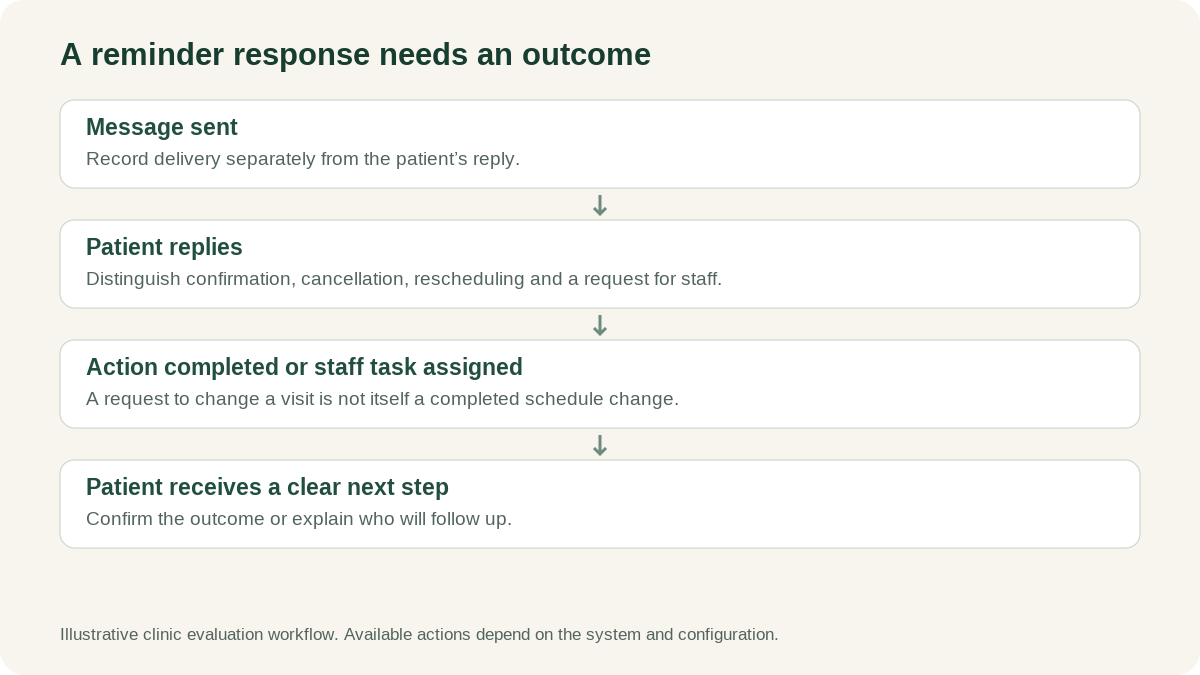
This diagram illustrates the response process; it contains no customer results. The practical test is whether the patient and reception would describe the appointment's status in the same way afterward.
Check the experience with a few made-up appointments
Try a normal confirmation, a corrected date, a change of location, a failed connection and a patient asking for a person. Inspect both the message and the record staff use. Make sure wrong-number reports and requests for help reach someone who can act.
The Cochrane review of mobile messaging reminders found improved attendance compared with no reminders in the included trials. Its studies ran through August 2012; it does not establish one universally best message or a TalkToMedi result. Your clinic should review delivery, replies, completed changes and attendance in its own setting.
TalkToMedi’s text and phone agents connect appointment communication with supported booking actions through patient outreach and appointment scheduling. Bring one of your current messages to a discussion and walk through a text reply, a phone conversation and the information your clinic needs to complete each request.
Before using these templates
The clinic should approve communication permissions, appropriate detail, wording and the response process. These are editable administrative examples, not legal or clinical instructions. A useful message makes the next step easier for the patient and leaves the clinic ready to follow through.